In the image types area you can create new images according to the specification you like to have.
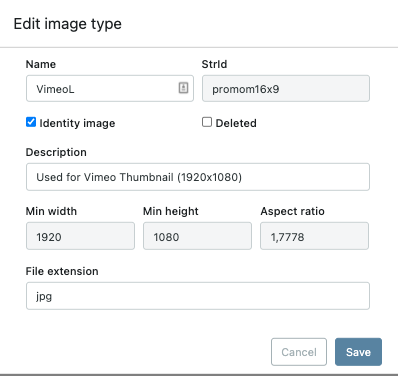
Name: Will be displayed in the dropdown list and on the images that have been uploaded
StrId: The unique name of the image type
Description: This information is for the user to understand how the image looks like Example “Used for Comcast as X2GalleryImage (2048×1536)”
Min Width and Min height: Sets the lowest resolution on the image, note that the system will accept higher resolution images
Aspect ratio: With/hight. Example 1920×1080 = 1,7778
File extension: Example .jpg
Identity: This sets what image to be used as identity image (thumbnail) on Delta
Deleted: If image type has been deleted
Testing again
works good 🙂
This is a test without email and website.